
Plays in the language you are reading. Tap any paragraph to start from there.
The first time I opened AppSumo, I closed the tab within five minutes.
Not because anything looked wrong. Because nothing looked familiar.
Lifetime prices that seemed too low to trust. "Codes" and "tiers" and "tacos" in the reviews. Countdown banners everywhere.
And a nagging suspicion that a catch was hiding in the vocabulary.
Two years and 27 purchases later, I can tell you the catch never existed. Only the learning curve did.
This guide flattens that curve completely, including the 10% first-order discount new buyers should never skip.
By the end, the platform will read like a menu instead of a puzzle. 🧩
🌮 Open AppSumo and Follow Along →
🧾 Key Takeaways
| Question | Short answer |
|---|---|
| What is AppSumo? | A 16-year-old marketplace selling software lifetime deals |
| How do deals work? | Vendors discount deeply for cash and users; you pay once |
| Typical price | $29–$199 once, vs $120–$1,400/year list |
| What are tiers and codes? | Licence sizes; buy more codes to unlock bigger limits |
| Safety net | 60-day money-back guarantee on most deals |
| Time to first purchase | Ten minutes, done properly |
| First move | 10% off your first order via email sign-up 🎁 |
💡 The Business Model: Why the Prices Are Real
Everything confusing about AppSumo dissolves once you understand who is paying for your discount.
Software startups face a brutal arithmetic.
Acquiring one paying customer through advertising typically costs $200 to $700. Paid to ad platforms before a dollar of revenue arrives.
AppSumo offers those startups an alternative buyer. Its audience of millions of deal-hunting entrepreneurs.
The startup lists a lifetime deal. Deep one-time pricing, usually $29 to $199.
In exchange for a surge of upfront cash, thousands of engaged users, public reviews, and word-of-mouth that outlives the campaign.
AppSumo takes a commission for supplying the crowd.
The discount you receive is the startup's marketing budget, redirected from ad platforms into your pocket.
Which is why the prices are not too good to be true
They are precisely as good as customer-acquisition economics allow. Which turns out to be very good indeed.
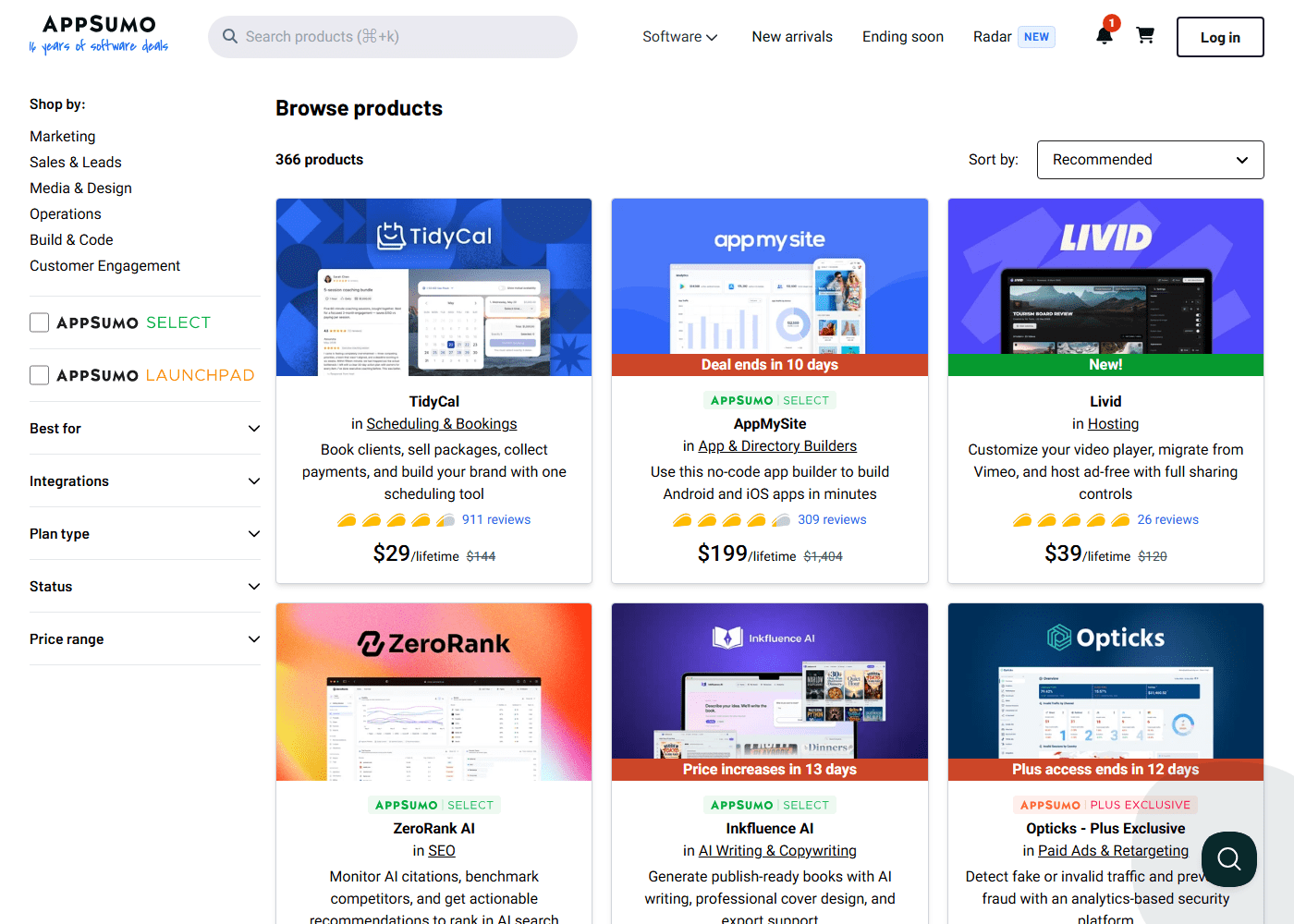
| Deal | Price | List |
|---|---|---|
| TidyCal | $29 | $144 |
| ZeroRank AI | $69 | $598 |
| AppMySite | $199 | $1,404 |
The platform has run this model since 2010. Its logo literally reads "16 years of software deals."
It currently lists 366 products across six categories.
Sixteen years of repeat customers is the strongest possible evidence that both sides keep winning.
Marketplaces built on tricks do not collect 911-review products and a community with its own vocabulary.
The full dossier lives in my is-AppSumo-legit analysis. For this guide, the summary suffices. 🏛️
📖 Reading a Deal Page Like a Veteran
Every deal page carries the same anatomy, and fluency takes five minutes.
| Element | What to read from it |
|---|---|
| Price block | Cost, list price, and which clock is running |
| Tier chart | The most consequential 30 seconds on the site |
| Badges | Select, Plus Exclusive, Originals |
| Reviews | Sort newest — week-two truth beats launch euphoria |
| Questions tab | Founder pulse; the best support forecast |
| Changelog | Shipped anything this month? |
The price block shows the one-time cost, the struck-through list, and critically whether a countdown is running.
"Deal ends in 10 days" means the campaign closes then, likely forever. "Price increases in X days" means launch terms are expiring.
Both clocks are genuine. AppSumo campaigns do not extend for stragglers.
The tier chart sits above the buy button and defines licence sizes.
Tier 1 might cover one user and modest limits. Tier 3, ten users and white-label rights.
Read it carefully, because the community's most repeated regret is buying today's tier instead of next year's.
The badges encode quality signals. Select marks deals vetted by the platform's team. Plus Exclusive marks members-only inventory. Originals are AppSumo's own products, with near-zero shutdown risk.
Below the fold live the sections veterans read first
Reviews carry taco ratings — one to five, the platform's stars.
The skill is sorting by newest rather than highest. Launch-week euphoria settles into honest signal by week two.
The newest ten reveal the post-hype truth about bugs, limits and support speed.
The questions tab shows founders answering buyers publicly.
Fast, substantive replies during a campaign predict a shipping team after it. Silence predicts silence.
Add the changelog and you hold the complete diligence toolkit — the same one that runs my buying guide. 🔍
🧱 Tiers, Codes and Stacking, Decoded
The platform's strangest word to newcomers is "codes." Here is the whole licence vocabulary in one place.
A code is simply a unit of licence. Buying one code activates Tier 1 of a deal.
Many deals allow stacking. Buying additional codes to unlock higher tiers.
Two codes might double your workspace count. Three might unlock agency features.
Stacking exists so buyers can right-size capacity. And its critical property is temporal.
Stacking is guaranteed only while the campaign runs.
After a deal closes, adding capacity typically means the vendor's regular pricing. Often ten times the in-campaign delta.
This asymmetry drives the veteran rule you will meet throughout my guides.
Project your needs twelve months out. Buy that tier now. And when genuinely uncertain, buy one tier up — the marginal cost is small and the 60-day guarantee covers the position.
Activation is mercifully boring
Your licence and instructions arrive by email within minutes.
Typically as a code you redeem on the vendor's site, or an account provisioned directly.
Two habits keep this frictionless.
Redeem immediately. A minority of deals carry activation windows, and same-day redemption makes the clause irrelevant.
Use one consistent email across AppSumo and vendor accounts. Your licence history, upgrade eligibility and support identity all key off it.
Across my 27 purchases, delivery has been instant twenty-seven times. 🗝️
🎁 10% Off Your First Order — Claim Before the Walkthrough →
🛡️ The 60-Day Guarantee: Your Risk Converter
The mechanism that transforms AppSumo from gamble into process is the refund policy.
Most deals carry a 60-day money-back guarantee. Roughly four times a typical SaaS trial.
Requested self-serve from your dashboard. No support conversation required.
I have exercised it twice across 27 purchases. One tool that did not fit my workflow, one with a broken export feature.
Both refunds landed within three business days. No retention scripts, no friction.
The exceptions are printed where you can see them. Plus membership is non-refundable, and a small number of deals mark their own terms.
Sixty days is long enough to generate evidence
That is the guarantee's strategic value, and it exceeds its insurance value.
My standing system, recommended from purchase one.
The moment payment clears, set two calendar reminders. Day 30: "am I actually using this?" Day 45: "keep or refund?"
Then deploy the tool into real work immediately. Not test projects — honest usage data is what the reminders will consult.
Under this system every purchase becomes a reversible experiment.
Keepers prove themselves inside the window. Disappointments exit at zero cost.
And the countdown banners that pressure other buyers lose their power over you entirely.
You can buy early in a campaign's golden window precisely because your downside is capped at a calendar entry. ⚗️
⏱️ The first-purchase timeline, end to end
🥧 Where my first-year mistakes came from
⏲️ The Ten-Minute First Purchase
Here is the walkthrough that converts this guide into a completed order.
| Minute | Action |
|---|---|
| 0 | Claim the 10% discount via email sign-up |
| 1–2 | Name the bill, before browsing |
| 3–5 | Find the candidate, run the anatomy scan |
| 6–8 | Reviews, questions tab, changelog |
| 9 | Buy next year's tier |
| 10 | Set reminders, redeem the licence |
Minute zero. Claim the discount through the email sign-up link.
It binds to your new account and applies automatically at checkout. It also enrols you in the deal alerts that constitute the platform's real intelligence layer.
Minutes one and two. Name your target before browsing.
The question is never "what looks good on AppSumo." It is "which bill or bottleneck am I erasing."
A $12 scheduler. A $29 email platform. A $50 SEO subscription.
Bill-first shopping is the single behaviour separating my nineteen keepers from my regrets.
Minutes three through five. Find the candidate, open the deal page, run the anatomy scan.
Guarantee line. Tier chart against twelve-month needs. Badge presence.
Minutes six through eight: diligence.
Newest ten reviews — settled tacos, recurring complaints, support-speed mentions. Questions tab — founder pulse. Changelog — shipped anything this month?
Three checks, three minutes, and you now know more than most buyers ever learn.
Minute nine: purchase. Select the tier — next year's, remember — check out, watch the 10% deduct.
Minute ten: the two habits that finish the job. Set the day-30 and day-45 reminders, and redeem the licence immediately.
Done. A professionally-diligenced, discounted, guarantee-protected lifetime licence.
Acquired in the time a subscription's onboarding video takes to buffer.
For a concrete first target: an Original like TidyCal at $29, or whatever tops the current best-deals board against your bills. 🏁
🔁 After the Purchase: The Loop That Builds a Stack
The first purchase teaches the mechanics. The loop builds the asset.
Weeks one and two: deploy hard.
Real client work, real content, real data. The tool earns its slot in production or reveals its gaps there. Both outcomes serve the day-45 decision.
Day 30: the honest usage check.
Embedded already? Consider stacking another code while the campaign lives.
Promising but unproven? Keep testing.
Unopened since week one? You already know, and the refund button carries no shame.
Day 45: decide with the evidence, then execute immediately.
Keep, and cancel the subscription it replaces — the actual savings moment, absurdly easy to forget.
Or refund, and bank the lesson about your own patterns.
Then repeat, funded by recovered money
The subscription you cancelled in month one finances deal two. Deals one and two finance deal three.
My entire $2,000 portfolio was self-funding after its first quarter.
The arithmetic is detailed in my lifetime-deals guide.
Along the way the platform's rhythm becomes second nature.
Monday scans of new arrivals. Golden-window purchases on days four through fourteen. September deferrals toward Black Friday.
And once your volume clears four purchases yearly, the Plus membership math turning positive.
None of it requires talent. All of it requires the loop, run honestly, one bill at a time. 📈
🙋 Three First-Timer Anxieties, Retired
"What if the company behind my tool disappears?"
It happens. Roughly one purchase in ten, across the community's experience and my own 27.
It is the model's honest cost, priced into the economics several times over. My three shutdowns cost $187, against roughly $9,000 net saved.
Favour Select badges, active changelogs and Originals. Diversify. And treat the occasional sunset as portfolio maintenance rather than betrayal.
"What if I pick the wrong tier?"
In-campaign, upgrade by stacking. Post-campaign, the mistake costs real money.
Which is why the twelve-month rule appears in every guide I write. When torn, one tier up, guarantee as backstop.
"What if I just… buy badly?"
You will, once or twice. I did, all in my first year, all traceable to shopping excitement instead of bills.
The system in this guide is precisely the machine that converts bad buying into rare buying.
Bill-first targeting. Newest-review diligence. Calendar reminders. Honest day-45 audits.
Trust the machine over your enthusiasm, especially during countdown banners. 🧠
💳 Checkout, Payment and What Arrives
The mechanical questions newcomers ask privately, answered plainly.
| Question | Answer |
|---|---|
| Payment methods | Card or PayPal |
| Currency | USD, converted by your bank |
| Delivery time | Minutes, by email |
| What arrives | A redemption code or a provisioned account |
| Where it lives after | Dashboard → My Products, permanently |
| Tax | Applied at checkout by region |
The 10% discount deducts visibly at checkout, so you can confirm it applied before paying.
If it does not appear, you either signed up after starting the order or the account already has a purchase history.
Your licence then lives in My Products permanently — not just for the guarantee window.
That page is the registry veterans check monthly. Purchase dates, redemption status, refund options, all in one list.
One practical habit worth adopting immediately.
Redeem from the delivery email the same day, then log into the vendor's tool once to confirm the licence actually landed.
Ninety seconds of checking now prevents the one genuinely annoying scenario in this whole process — discovering an unredeemed code weeks later, after the activation window closed.
🗺️ The Marketplace Map
Navigation fluency saves minutes on every future visit.
| Location | Use it for |
|---|---|
| Category shelves | Bill-first shopping by function |
| New Arrivals | The Monday scan |
| Ending Soon | The deadline aisle — decide today |
| Radar | Positioning ahead of crowds |
| Search bar | Known targets, plus filters |
| Your dashboard | Licences, history, refunds |
The category shelves organise the 366-product inventory by function.
Category browsing beats homepage scrolling the moment you shop bill-first, because your target's category is determined by the bill.
New Arrivals is tomorrow's best-seller shelf. Launches often carry their most generous terms early, before mid-campaign price bumps.
Ending Soon is the only shelf where the correct response to hesitation is a decision today.
Closed campaigns rarely return outside Black Friday encores.
Your account dashboard is the operational hub veterans check monthly.
Owned products, licence keys, refund requests and purchase history all live there.
Learn the six locations and the platform's apparent sprawl collapses into a workflow. 🧭
🆚 How This Feels vs Regular SaaS
The experiential difference deserves a section, because it recalibrates instincts trained elsewhere.
| Subscription-land | Here |
|---|---|
| Trial clock pressures shallow testing | 60 days at full feature depth |
| Cancellation buried four menus deep | A refund button |
| Renewal anxiety, plan changes | The licence you bought is the licence you hold |
| Pressure to stay | Pressure to decide |
There is no trial clock pressuring shallow evaluation. The guarantee follows purchase, so evaluation happens on real work.
There is no cancellation labyrinth. There is a refund button.
No renewal anxiety. No annual-pricing hostage negotiation. No "your plan has changed" email.
The countdown pressure that does exist pushes toward deciding, not toward staying.
Which is a fundamentally healthier pressure to shop under.
The trade-offs deserve equal candour
Vendor support quality varies more than enterprise SaaS. You are buying from startups, and the founder answering questions during the campaign is often the support desk after it.
Product maturity varies too. Some deals are polished veterans. Others are earlier-stage tools whose roadmaps you are partially betting on.
And the ecosystem rewards attention in a way set-and-forget subscription buying never demands.
The net: AppSumo trades subscription-land's billing anxiety for a modest diligence tax, paid in minutes per purchase.
For buyers willing to pay that tax — and this guide just handed you the curriculum — the exchange rate is spectacular. 💳
🚫 When You Should Close the Tab
I earn a commission here. That is exactly why this section exists.
When you cannot name the bill. Browsing without a target is how the abandoned pile forms, and 40% of my first-year mistakes started that way.
When you want zero involvement. This ecosystem asks for minutes of diligence per purchase. Subscription-land does not, at subscription prices.
When you need enterprise support guarantees. You are buying from startups. Founder responsiveness is the ceiling.
When you will not deploy inside sixty days. An untested tool at day 59 is a coin flip, not a decision.
When the tier chart does not cover next year. Post-campaign upgrades cost real money. Better to skip than to under-buy.
When the countdown is the only reason you want it. That is the machinery working on you, not a use case.
🏁 Verdict: Simpler Than It Looks
Strip away the vocabulary and AppSumo works like this.
Startups trade deep discounts for customers. You trade fifteen minutes of diligence for software at one-to-three months' subscription cost. And a 60-day guarantee referees the exchange.
The mechanics — tiers, codes, stacking, activation — are a menu, not a maze.
The risks are real, bounded, disclosed and manageable with habits any buyer can adopt on day one.
Sixteen years, 366 live products, and communities of forensic reviewers stand behind the model's durability.
My own ledger stands behind its personal arithmetic. $2,088 spent, $11,300+ in subscription value, nineteen working keepers.
Your first deal is ten minutes away
And the sequence never changes.
Sign up for the 10%. Name the bill. Run the diligence. Buy next year's tier. Set the reminders.
The platform will still look like a carnival of countdown timers from the outside.
From the inside, it is the most process-friendly software store on the internet — and now you hold the process. 🌮
🌮 Start Your First Deal on AppSumo →
🎁 Get 10% Off First Order with Email Sign Up →
❓ FAQ
How does AppSumo make money?
Commission on each deal sold, plus its own products and the Plus membership. The model aligns everyone: vendors get users and cash, buyers get lifetime pricing, AppSumo earns the match.
Do I pay monthly for anything?
Not for deals. Lifetime means one payment for the product's life. The only subscription is the optional Plus membership, which is a discount program rather than a requirement.
How do licences arrive after purchase?
By email within minutes. A redemption code for the vendor's site, or a directly provisioned account. Redeem immediately — a few deals carry activation windows.
What are tacos in the reviews?
AppSumo's star ratings, one to five. Sort reviews by newest and trust the week-two settled average over launch-day scores.
Can I return a deal if it disappoints?
Yes. Most deals carry the 60-day guarantee, self-serve from your dashboard. My two refunds each processed within three business days.
What should my first purchase be?
The deal that erases a bill you paid this month, found via the best-deals board. Or the standing safe pick, TidyCal at $29, bought with your 10% first-order discount.
Do I need to understand every term before buying?
No. Codes, tiers and stacking are the only three that affect a first purchase, and all three are explained above. The rest you absorb by shopping.
What if I buy and never use it?
That is what the day-30 check is for. Refund it, and note the pattern — unused purchases almost always trace back to buying without naming a bill first.
Related reading: What is AppSumo? · Lifetime deals guide · Is AppSumo legit? · The buying guide

- Video Content in 2026: What the Engagement Data Shows - October 21, 2026
- Monetising a Channel That Uses AI: The Rules That Bite - October 21, 2026
- SEO or Paid Ads? The Cost-Per-Acquisition Data - October 18, 2026