How to Use MuleRun: Step-by-Step Guide for Beginners (2026) ๐Ÿด

So you found MuleRun. And now you are thinking โ€” where do I even start?

Do not worry. I felt the same way on day one. This guide walks you through every step. From sign-up to your first finished task.

No coding. No stress. Just simple steps you can follow right now. By the end, you will run your first AI agent. The easy way. ๐Ÿ‘‡

โš ๏ธ ๅ…ณ่”ๆ–นๆŠซ้œฒ๏ผš Some links below are affiliate links. If you sign up through them, I may earn a small commission โ€” at no cost to you. I only share tools I actually use.

๐Ÿš€ Follow along โ€” start MuleRun free (no credit card)

Open MuleRun Free โ†’

๐Ÿ“Œ ไธป่ฆๆ”ถ่Žท

New to MuleRun? This simple step-by-step guide takes you from sign-up to your first finished AI task. No code, no stress. Beginner friendly.

  • ๐Ÿ†“ Free plan: 500 bonus credits + 200 refreshed daily, no credit card needed
  • ๐Ÿ’ณ Runs on credits ($1 = 100); paid plans start at $16/mo (Plus)
  • ๐ŸŒ™ An always-on AI agent that completes tasks 24/7 โ€” not just a chatbot

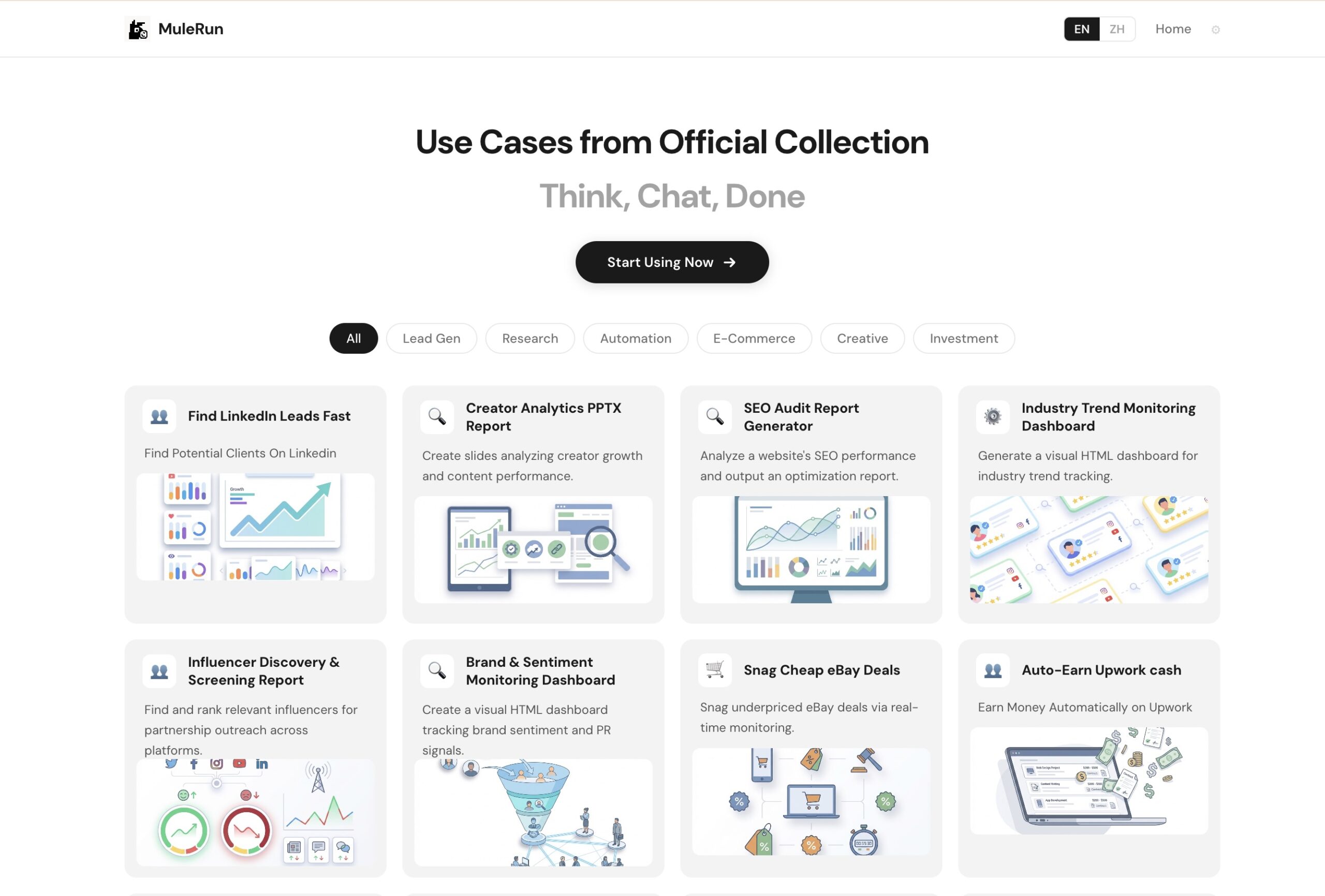
MuleRun Use Cases collection โ€” ready-made agents to start with

First, what is MuleRun? (30-second version) ๐Ÿค”

Quick context before we start. In plain words.

MuleRun is an AI agent platform. An agent is a worker, not just a chatbot.

A chatbot answers questions. An agent does the full task. It opens tools. It takes steps. It hands you a finished result.

And the best part? It runs on a computer that stays on all day and night. So you can start a task and walk away. Come back later. Your work is done.

If you want the full background, read my MuleRun ๆŒ‡ๅ—ๆ˜ฏไป€ไนˆ๏ผŸ first. Otherwise, let's get hands-on.

ๅผ€ๅง‹ไน‹ๅ‰ไฝ ้œ€่ฆๅ‡†ๅค‡ไป€ไนˆ โœ…

Not much, honestly. Here is the whole list.

  • ๐Ÿ’ป A device with internet. A laptop or desktop works great.
  • ๐Ÿ“ง An email to sign up. That is it.
  • ๐Ÿšซ No credit card needed for the free plan.
  • ๐Ÿง  No tech skills. None.

MuleRun is built for normal people. Not just developers. If you can send an email, you can use this.

The whole flow at a glance ๐Ÿ—บ๏ธ

Before the details, here is the entire loop. Five simple steps.

1. Sign upfree, no card 2. Open chatthe task box 3. Describein plain words 4. Run agentit gets to work 5. Get resultuse it

That is it. Now let's do each step for real.

Step 1: Sign up for free ๐Ÿ“

Go to the MuleRun site. Look for the "Sign up for free" button. Click it.

Enter your email. Set your account. That is the whole thing.

Once you are in, you land on the dashboard. This is your home base. And right away, you get bonus credits. 500 to start. Plus 200 more refreshed every day.

Credits are how you pay for tasks. One dollar equals one hundred credits. The free bonus gives you real fuel to test. Need a hand here? My MuleRun sign-up guide shows every screen.

Step 2: Find the chat box ๐Ÿ’ฌ

This is where the magic starts. It is just a simple text box.

You type what you want in plain English. Like talking to a helper. You do not write code. You do not pick complex settings.

You describe the goal. MuleRun figures out the steps. Simple as that.

MuleRun dashboard with the task chat box ready

See that clean box? That is your command center. Everything starts there.

Step 3: Run your first task ๐Ÿƒ

Let's keep your first one easy. Try something simple.

Type this: "Search today's top news and put it in a clean file."

Then hit "Run Agent." Now watch. The agent gets to work. It opens tools. It browses. It builds.

You can see what it is doing. Step by step. Full visibility. No black box.

While it runs, here is what happens behind the scenes. The agent uses a dedicated computer. Not your browser tab. So even if you close the page, the work keeps going. That is the always-on power.

Step 4: Read your results ๐Ÿ“‚

When the task is done, MuleRun delivers the output.

It might be a file. A report. A document. A summary. You can review it. Download it. Use it right away.

If something looks off, you can redirect the agent. Or run it again with more detail. Easy fixes.

๐Ÿ’ก Ready to run your first task? Grab your free credits

ๅ…่ดนๅผ€ๅง‹ โ†’

6 great first tasks to try ๐ŸŽฏ

Not sure what to ask? Here are beginner-friendly ideas. Each shows off a different power.

  1. ๐Ÿ“ฐ News digest โ€” "Find today's top news in [my industry] and save it to a file."
  2. ๐Ÿ“Š Simple report โ€” "Research [topic] and make a one-page report with key points."
  3. ๐Ÿ“„ A document โ€” "Write and format a short Word doc about [subject]."
  4. ๐Ÿ–ผ๏ธ A basic deck โ€” "Make a short branded slide set on [topic]."
  5. ๐Ÿ“ˆ Data summary โ€” "Look at this spreadsheet and give me the key takeaways with a chart."
  6. โœ‰๏ธ An email draft โ€” "Write a friendly update email about [news]."

Each one teaches you the flow fast. Pick the one closest to your real work. For a bigger list, see my MuleRun ็”จไพ‹ post.

3 worked examples, step by step ๐Ÿงช

Let me show three real tasks in full. So you feel confident before you try.

Example 1: A research file ๐Ÿ“š

Type this: "Find the top 5 trends in my industry this week and save them to a file with sources."

Hit Run Agent. Watch it browse and gather. In a few minutes, you get a tidy file. Each trend listed. Each source linked. You did nothing but ask.

I use this every Monday. It replaced an hour of manual googling. Now it is two minutes of reading.

Example 2: A data summary ๐Ÿ“Š

Say you have a spreadsheet of sales numbers. Upload it. Then ask: "Look at this data and tell me the key takeaways with a simple chart."

The agent reads it. It finds the story. It builds a chart. You get a clean summary you can drop straight into a report. No formulas. No fiddling.

Example 3: A polished email โœ‰๏ธ

Ask: "Write a friendly update email about our new product launch."

The agent drafts it in a warm, clear tone. You tweak a detail or two. Then it is ready to send. A five-minute job becomes thirty seconds.

MuleRun agents handling many task types at once

See the pattern across all three? You describe the outcome. The agent does the steps. You get a finished thing. That is the whole skill.

MuleRun vs doing it by hand โฑ๏ธ

Let me show why this matters. Here is the same week, two ways.

Task By hand With MuleRun
๐Ÿ“ฐ Daily news digest 20 min/day 2 min review
๐Ÿ“Š Weekly research report 60 min 5 min review
๐Ÿ–ผ๏ธ Client slide deck 90 min 20 min polish
๐Ÿ“ˆ Spreadsheet analysis 45 min 5 min review

Add it up. That is hours back every week. Not because you work harder. Because the agent does the slow part. You just guide and approve.

That is the real reason to learn this tool. It is not about being lazy. It is about spending your time on what actually matters.

Pro tips that make a big difference ๐ŸŒŸ

These small habits changed how well MuleRun worked for me.

Tip 1 โ€” Be clear. The more detail, the better the result. Instead of "make a report," say "make a one-page report with charts and three key takeaways." Detail in, quality out.

Tip 2 โ€” Start small. Test one task before you stack big jobs. Learn the rhythm first.

Tip 3 โ€” Use the overnight power. Queue tasks before bed. Check them in the morning. This is the whole point of an always-on agent.

Tip 4 โ€” Watch your credits. Big jobs use more. Plan your usage. My ๅญฆๅˆ†ๆŒ‡ๅ— explains the math.

Tip 5 โ€” Save your best prompts. When one works great, keep the wording in a notes file. Reuse it. You build your own little library over time.

How task requests work ๐Ÿงฉ

Let me show the pattern. It is always the same.

๐Ÿ—ฃ๏ธ Describe itPlain words, clear goal โš™๏ธ Run itAgent takes the steps โœ… Get itFinished result, ready โ†’ โ†’

Describe. Run. Get. Learn that loop once, and every task feels the same. That is the beauty of it.

Staying in control: safety basics ๐Ÿ”’

MuleRun has built-in checkpoints. This matters.

For big actions, it asks before it acts. You can require human review on certain steps. You can pause the agent anytime. You stay in control. Always.

So you can explore freely as a beginner, without fear of it running wild. Curious about deeper safety? Read my MuleRunๅฎ‰ๅ…จๅ—๏ผŸ review.

When should you upgrade? ๐Ÿ’ณ

Start free. Always. But here are the signs you are ready for more.

Sign What it means Suggested plan
๐Ÿ”‹ You run out of credits often Light bonus not enough Plus ($16/mo)
๐Ÿ“ˆ You run tasks daily Need monthly credits Plus or Super
๐Ÿข You run a whole workflow on it Heavy, serious use Super or Pro
๐Ÿ‘ฅ You have a team Shared use Team plan

Only upgrade after free proves the value to you. My full MuleRun pricing guide compares every plan side by side.

่ง‚็œ‹ๅฎŒๆ•ดๆผ”็คบ่ง†้ข‘๐ŸŽฅ

Prefer to see it in motion? Here is my step-by-step video tutorial.

Common beginner questions ๐Ÿ™‹

A few things new users always ask me.

What if the result is not quite right? No stress. Refine your request and run it again. Add more detail. Be more specific. Each clear instruction gets you closer.

What if I run low on credits? The free plan refreshes some credits daily. For learning, that daily refresh is usually enough. If you need more, top up or upgrade.

What if I do not know what to ask? Start with something you already do by hand. Research. A report. A short doc. Pick a task you know well, so you can judge the result fairly.

Will it make mistakes? Like any AI, it can. That is why there are checkpoints and human review. You always keep the final say.

A simple first-week plan ๐Ÿ“…

Want a clear path? Follow this.

Day 1 โ€” Sign up free. Run one easy task, like a news digest. Just feel the flow.

Day 2โ€“3 โ€” Try two more task types. A report. A short doc. Notice what works.

Day 4โ€“5 โ€” Use the overnight power. Queue a task before bed. Check it at sunrise.

Day 6โ€“7 โ€” Hand off your most boring weekly chore. See how much time it saves.

By the end of the week, you will know exactly what MuleRun can do for you. No guessing.

Build your own prompt library ๐Ÿ“’

Here is a habit that made me much faster. And it costs nothing.

Keep a simple notes file. Every time a request works great, paste the exact wording in. Label it. "Weekly research report." "Client deck base." "News digest."

Next time you need that task, copy your saved prompt. Tweak the details. Run it. You skip the trial-and-error completely.

Over a few weeks, you build a personal toolkit. Your best prompts, ready to reuse. This is how light users turn into power users without extra effort.

MuleRun mascots around a keyboard โ€” build your workflow once, reuse forever

The goal is to stop reinventing the wheel. Set up a task once. Reuse it forever. That is when MuleRun really starts to pay off.

Troubleshooting: when things go sideways ๐Ÿ”ง

New tools have bumps. Here is how to handle the common ones.

The result missed the point. Your request was likely too vague. Add detail. Name the format, the length, the must-include points. Then run again.

It is taking a long time. Big tasks take longer. That is normal. This is exactly when the always-on machine helps โ€” let it run and come back later.

I ran out of credits. Wait for the daily refresh, or top up. For learning, the free daily credits usually stretch far enough.

I am not sure it did it right. Always review the output yourself. You are the final check. If something is off, redirect the agent with clearer instructions.

None of these are real problems. They are just part of learning the rhythm. By week two, you will barely hit them.

A mindset shift before you start ๐Ÿง 

One last thing. The biggest change is in how you think.

Do not treat MuleRun like a fancy chatbot. Do not just ask for answers.

Instead, hand off whole tasks. Stop doing the boring work yourself. Start describing the result you want, and let the agent build it.

That shift is the real unlock. And it starts with your very first run.

Who uses MuleRun, and for what ๐Ÿ‘ฅ

You might wonder if MuleRun fits your kind of work. Here is how different people use it.

่‡ช็”ฑ่Œไธš่€… hand off the slow parts of client work. Research. First drafts. Data cleanup. They deliver faster and take on more clients.

Small business owners automate the boring daily checks. Competitor prices. Stock levels. Quick reports. They get the info without the grind.

ๅ†…ๅฎนๅˆ›ไฝœ่€… use it for research, outlines, and repurposing. They spend more time creating and less time digging.

่ฅ้”€ไบบๅ‘˜ automate trend research, social prep, and reporting. The agent gathers; they strategize.

Founders run overnight checks on metrics and competitors. They wake up to a briefing instead of building one.

MuleRun Studio โ€” one platform for images, video, and music tasks too

And it is not only "work" tasks. MuleRun Studio handles creative jobs too. Images. Video. Music. So your range is wider than you might first think. Whatever your role, the loop is the same: describe, run, get.

How MuleRun is different from a chatbot ๐Ÿ†š

Since you are learning, this is worth nailing down. Because it changes how you use the tool.

A chatbot lives in a chat window. You ask, it answers, the work stops there. You still open your tools and do the real job yourself.

MuleRun takes the next step. It opens the tools. It does the steps. It hands you the finished file. And it keeps running even after you close the tab.

So do not just ask MuleRun questions. Hand it tasks. That mindset is the difference between using it like a search box and using it like a worker. For the full breakdown, see MuleRun ๅฏนๆฏ” ChatGPT.

ๅธธ่ง้—ฎ้ข˜โ“

Is MuleRun hard to learn?
No. The basic loop โ€” describe, run, get โ€” takes minutes to learn. Day one feels new, but by your fifth task it is second nature.

Do I need to install anything?
No. MuleRun runs in your browser and on its own cloud machines. Just sign up and start.

Can I use MuleRun for free?
Yes. The free plan gives 500 bonus credits at signup and 200 daily. No card needed. See my ๅ…่ดน่ฏ•็”จๆŒ‡ๅ—.

What can I build with MuleRun?
Reports, slide decks, research files, documents, data summaries, short videos, and more. See MuleRun ่ƒฝๅšไป€ไนˆ.

How do credits get used up?
You spend credits when an agent runs a task. Bigger jobs cost more. Track usage with my ๅญฆๅˆ†ๆŒ‡ๅ—.

Is MuleRun better than ChatGPT for tasks?
For finishing full tasks, yes โ€” it takes action and runs 24/7. See the MuleRun vs ChatGPT comparison.

Setting up your first automation ๐Ÿค–

Once you are comfortable running single tasks, try this next level. Scheduling.

This is where MuleRun goes from "handy tool" to "real time-saver." Instead of running a task by hand each time, you set it to run on its own.

Here is the idea. Pick a task you do on a schedule. A daily news check. A weekly report. A nightly price scan. Then set the agent to run it at a set time.

The always-on machine does the rest. It runs while you sleep. It runs while you are in meetings. It runs while you live your life. You just collect the results.

My advice for your first automation: keep it simple. Schedule one daily task. Maybe a morning news digest in your niche. Let it run for a few days. See how it feels to wake up to finished work.

Then expand. Add a weekly report. Then a monitoring task. Slowly, you build a little team of agents working in the background. That is the dream this tool is chasing. And it is real, once you set it up.

One note: scheduled and heavy tasks use more credits over time. So watch your usage as you automate more. Match your plan to your real workload. My pricing ๅ’Œ credits guides help you plan that.

Quick recap of the whole flow ๐Ÿ”

Let's lock it in. Here is everything, in order.

  1. Sign up free. Grab your bonus credits.
  2. Open the chat box. Your command center.
  3. Describe your task in plain words. Be specific.
  4. Hit Run Agent. Let it work.
  5. Read and use your result. Refine if needed.
  6. Save good prompts. Reuse them.
  7. Schedule repeat tasks. Let it run on its own.

Master those seven, and you have mastered MuleRun. Everything else is just bigger versions of the same loop.

ๆœ€ๅŽ็š„ไธ€ไบ›ๆƒณๆณ•๐Ÿ

Learning MuleRun is not a giant leap. It is a few small steps.

Sign up. Open the chat. Describe a task. Run it. Read the result. That is the whole loop.

You will learn more in five minutes of doing than an hour of watching. So take that first step today. Pick one boring task. Hand it over. Watch it come back done.

That single test will make this whole guide click. Then you will get it.

๐Ÿด Run your first AI agent today โ€” free, no credit card

ๅ…่ดนๅผ€ๅง‹ MuleRun โ€” 500 ็‚นๆ•ฐ โ†’

่”็›Ÿ้“พๆŽฅ ยท ๆ— ้œ€ไฟก็”จๅก ยท ไปทๆ ผๆฅ่‡ช mulerun.com๏ผŒๅฏ่ƒฝไผšๆœ‰ๆ‰€ๅ˜ๅŠจ

Last updated: 2026. Steps, features, and prices are based on official information from mulerun.com at the time of writing and may change. This guide reflects my own hands-on use. It is general information, not professional advice.

ไบšๅง†ยทๅทดๅ“ˆๆœๅฐ”ยทไนŒๆ™ฎๅก็ฝ—่’‚

ๅ‘่กจ่ฏ„่ฎบ

ๆปšๅŠจ่‡ณ้กถ้ƒจ